I created a tracking issue for the Development team to determine what the exception message "read and Write not equal" means with Tab file Dasa0325_01. We should hear from them early next week.
In the meantime, can you verify with your data provider in what projection your various Tab files are in? Except for 0201_01 which is in Longitude/ Latitude, it is not clear in what projection the other Tab files are in and that might be the problem why they don't display correctly with Google Map because the proper projection conversion is not done.
Actually these files are generated by the TEMS application. So, I am not able to know the projection of files. And from the day one with map suite, I am fighting with projection, Hope the new version of map suite 5.5 will bring some method. I viewd these file in mapinfo and according to mapinfo the projections are
but except the Dasa0324_01.tab file, all files are view in my default map control (without Goole Overlay). My default map uint is decimaldegree and its showing all files except 3rd, so I think all projections are Longitude/Latitude.
Projection with Map Suite is pretty straightforward. You have the internal projection (what the layer is originately in) and the external projection (the projection to set to). It is the responsability of the user to know its data and in what projection it is in.
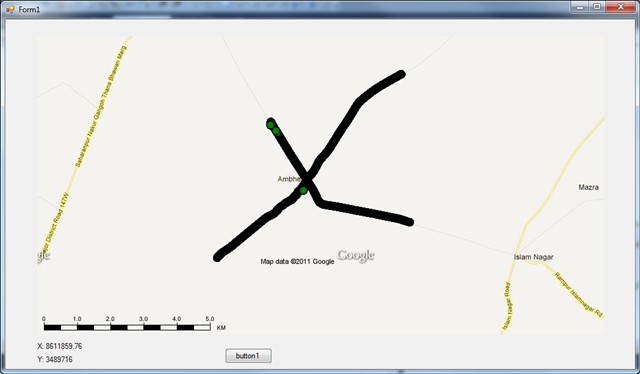
By looking at your 0201_01.TAB, I don't know how you say it is in meters. Seeing the coordinates, I guessed that the layer is in Long/Lat so I used the code below to have it displayed correctly with Google Map and it seems to show correctly as you can see in the screenshot. You can also see the code I used:
winformsMap1.MapUnit = GeographyUnit.Meter; //Map set to Meter because Google Map projection (Spherical Mercator) is in meter.
GoogleMapsOverlay googleMapsOverlay = new GoogleMapsOverlay(); googleMapsOverlay.MapType = GoogleMapsMapType.RoadMap;
winformsMap1.Overlays.Add(googleMapsOverlay);
ManagedProj4Projection proj4 = new ManagedProj4Projection(); proj4.InternalProjectionParametersString = ManagedProj4Projection.GetWgs84ParametersString(); //Internal projection of 0201_01.TAB proj4.ExternalProjectionParametersString = ManagedProj4Projection.GetGoogleMapParametersString(); //Spherical Mercator Projection (Google Map)
TabFeatureLayer tabFileFeatureLayer1 = new TabFeatureLayer(@"C:\ThinkGeo\Support\Posts\9583\TestGoogleApp\TestGoogleApp\TestGoogleApp\TabFile\0201_01.TAB", TabFileReadWriteMode.ReadOnly); tabFileFeatureLayer1.ZoomLevelSet.ZoomLevel01.DefaultPointStyle = PointStyles.CreateSimpleCircleStyle(GeoColor.FromArgb(100, GeoColor.StandardColors.Green), 12, GeoColor.StandardColors.Black); tabFileFeatureLayer1.ZoomLevelSet.ZoomLevel01.ApplyUntilZoomLevel = ApplyUntilZoomLevel.Level20; tabFileFeatureLayer1.FeatureSource.Projection = proj4; //Sets the projection of 0201_01.TAB to go from WGS84 to Spherical Mercator (Google Map)
LayerOverlay layerOverlay = new LayerOverlay(); layerOverlay.Layers.Add(tabFileFeatureLayer1);
As per your reply, I am not saying the meter map, its saying by mapinfo. From the starting of this thread, I always saying my first file 0201_01.tab is running perfactly on both case (with googlemap and without goolge map), with this file I have no issue. I had sended also code to you with tab file. If you run my code the first file will show. But what about the other files?
Second thing - I am not getting file from other source, I am getting files from TEMS application, so I think there is no prj files, from which I will know the projection. From last one year, there was many discussion was over regarding How to know projection from .tab file? I also created enhancement tracker regading this, but I dont know when this enhancement will complete.
In normal mode my map unit is decimal degree, and when any file show on proper place whout setting the projection, I think this file unit is decimal degree and these file show properly on map place without setting the projection. And except the third file (Dasa0324_01.tab ) all files display in normal mode, so this is my perception all files are lat/long projection.
I am not a map expert, but I think when a log file exported from TEMS application all contains the same projection, but I am not sure about this.
So, please help with other files problem in googlemap.
-0201_01.TAB can be displayed fine on both decimal degrees map and Google Map in India. No problem there.
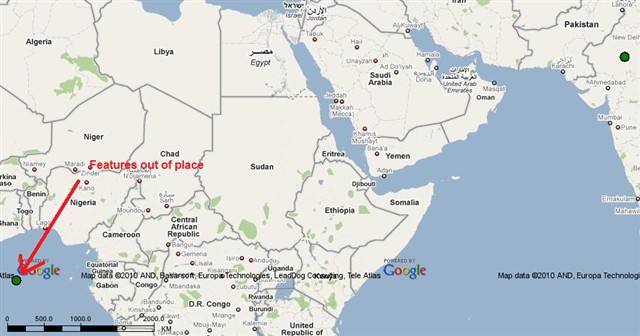
-AZX0325_1.TAB, as for 0201_01, it can be displayed fine on both decimal degrees and Google Map in India. But there seem to be some features that are out of place and are displayed in the middle of the Atlantic ocean. I think this a problem with your tab file. It is not a Map Suite issue. (see screenshot below)
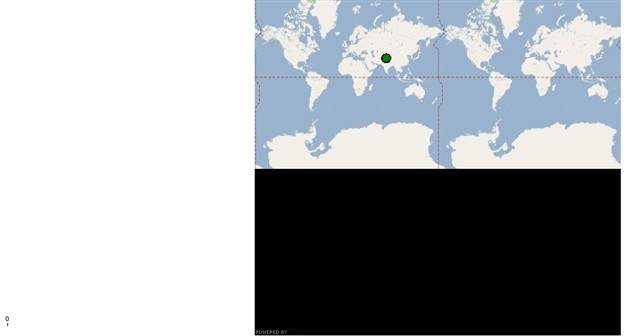
-bulend010.TAB seems to have its features in decimal degrees and they display correctly in both decimal degrees map and Google Map but its bounding box is completely off causing some serious performance issues. This a problem in the tab file itself, not in Map Suite. The screen shot below show when the extent of Google Map is set based on the bounding box of bulend010 which is completely off.