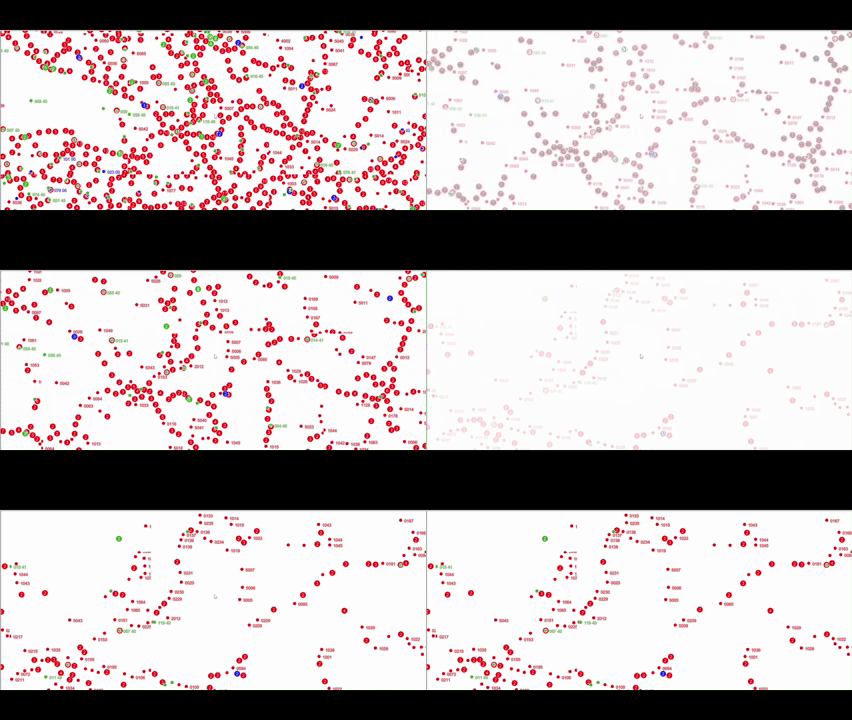
Observed in the WPF GPU map with a transparent WMS: after zooming and waiting for
the new tiles to finish loading, symbols from previous zoom levels remain visible
under the current tiles. Repeated zooming accumulates overlapping map content.
The affected map uses a shared native EPSG:25832 grid and declares the WMS through MapStyle.AddRaster. Raster fading is already zero (the default for that API).
Inspection of the installed beta181 assemblies identifies a matching path:
Style-declared raster layers always enable fallback tiles in the GPU controller.
The controller queues the ready tiles for the current coverage, then also queues
cached tiles for the same source whose exact tile keys are not in that current
set. Overlap with ready coverage is not excluded. The older tiles precede the
current ones in the draw list.
The raster draw pass disables stencil/depth testing and alpha-blends those tiles.
It does not use the tile’s isCoverageTarget flag to mask superseded coverage;
the flag is only read by the controller’s zoom diagnostics in this assembly.
This lets transparent pixels in a fully loaded current tile reveal older WMS
symbols. Reducing fade duration cannot remove that underlying content.
Please make fallback coverage exclusive per raster source: once a current tile is
ready, its full footprint must replace older coverage, including fully transparent
pixels. Fallback tiles should fill only regions still awaiting current tiles.
Apply this in both zoom directions and preserve layers underneath the WMS.
Reproduction:
Add a transparent WMS with point symbols or labels through new MapStyle().AddRaster(source, "wms", fadeDurationInMilliseconds: 0).
Use WmsRasterTileSource(client, sharedGrid) on a native EPSG:25832 map.
Wait for the first view to finish loading, zoom in several levels, and wait again.
Observe earlier symbols underneath the new symbols; repeat while zooming out.
For a deterministic regression, use a raster source returning transparent PNGs
with different marks at each zoom. Load a parent and then its children, including
a fully transparent child, and test the reverse transition too. The old marks must
disappear within replaced footprints while genuinely missing tiles retain fallback
coverage. Check both full and partial layer opacity, with a visible layer beneath.
The same test should also cover the default Mercator grid; the observed application
case is the native grid.
The fallback set excluded held tiles by exact tile key, not by whether their ground was already covered — so once a tile’s children arrived it stayed in the draw list for good, queued before the current coverage, blended without stencil or depth. IsCoverageTarget was read by nothing but a diagnostic. The comment above it said what it had assumed: “fallback tiles are the opaque backing the current coverage draws over”. True of imagery, false of a WMS of symbols on nothing.
A held tile is now cut to the cells the current coverage has not filled, and drawn only there — both halves of what you asked for: a tile still in flight keeps its ground covered, and the loaded tiles around it stay clean. Per raster source, both zoom directions, layers underneath untouched. It applies to every transparent raster source; your case made it visible.
The fade you did not ask for. You passed fadeDurationInMilliseconds: 0, but AddRaster did not write that 0 into the style document. When raster-fade-duration is missing, the style spec uses 300 ms. So your layer faded for 300 ms. That was our bug, and it is why your analysis in the first post assumed there was no fade. The 0 is written now. The parameter’s default is 300, which is what everyone has been getting anyway.
The empty ground during the fade. beta184 removes the previous zoom’s tile as soon as the new tile loads. But a tile that is still fading in is not opaque yet, so there was nothing underneath it. Now the previous tile stays until the fade finishes.
The large symbols. When a tile has not arrived yet, we fill that area with the tile from the zoom above, scaled up. That works for aerial imagery. It does not work for symbols, because the symbols are scaled up too and end up the wrong size next to the correct ones. You can now turn this off for a source:
var wms = new WmsRasterTileSource(client, sharedGrid) { DrawsFallbackTiles = false };
Those areas then stay empty until their own tiles arrive, and whatever is below the layer shows through. Tiles that have already arrived are not affected.