Hi all,
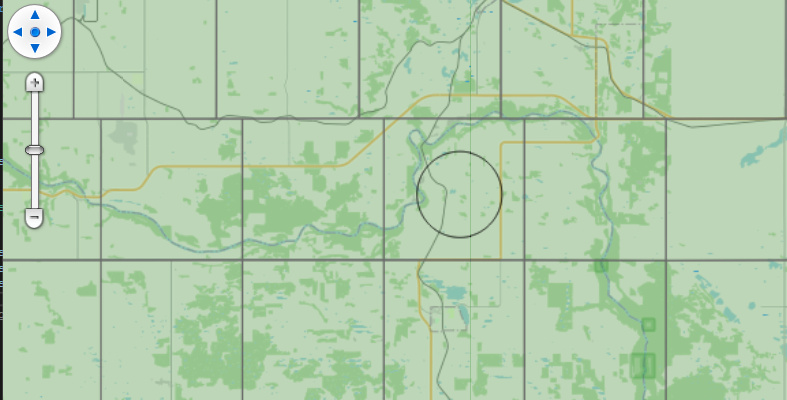
I have produced a simplified example included below to show the behavior I am seeing in our application along with a picture showing the behavior. Essentially the tool I am working on needs to draw a circle given a point feature and a user defined radius. The test data I am using is a township grid where each of the grid squares is 6 miles by 6 miles. With the radius of the EllipseShape set to 3.0 and the units set to DistanceUnit.Mile I am seeing that that EllipseShape diameter is roughly 2/3 of the expected 6 miles as you can in the included image I clicked roughly in the center of the grid square. I have double checked our grid data for accuracy.
Any ideas on what might be causing this?
 private async void OnMapViewLoaded(object sender, RoutedEventArgs e)
 {
     MapView.MapUnit = GeographyUnit.Meter;

     OpenStreetMapOverlay osm = new OpenStreetMapOverlay();
     MapView.Overlays.Add(osm);

     LayerOverlay testOverlay = new LayerOverlay();
     MapView.Overlays.Add("test overlay", testOverlay);

     Add3DTestLayer(testOverlay);

     MapView.MapClick += MapView_MapClick;

     MapView.CurrentExtent = new RectangleShape(-12620874, 6871071, -12553663, 6825972);

     await _mapView.RefreshAsync();
 }

private async void MapView_MapClick(object sender, MapClickMapViewEventArgs e)
{

    AreaStyle areaStyle = AreaStyle.CreateSimpleAreaStyle(GeoColors.Transparent, GeoColors.Black, 1);


    InMemoryFeatureLayer clickLayer = new InMemoryFeatureLayer();
    clickLayer.Projection = new Projection(3857);
    LayerOverlay layerOverlay = new LayerOverlay();

    ZoomLevel selectionZoomLevel = clickLayer.ZoomLevelSet.ZoomLevel01;
    selectionZoomLevel.CustomStyles.Add(areaStyle);
    selectionZoomLevel.ApplyUntilZoomLevel = ApplyUntilZoomLevel.Level20;

    clickLayer.InternalFeatures.Add(new Feature(new EllipseShape(e.WorldLocation, 3.0,   _mapView.MapUnit, DistanceUnit.Mile)));

    layerOverlay.Layers.Add(clickLayer);
    await _mapView.RefreshAsync(layerOverlay);
}

        private void Add3DTestLayer(LayerOverlay testOverlay)
        {
            var test3DLayer = new FileGeoDatabaseFeatureLayer("C:/ProgramData/{redacted name township grid data}.gdb")
            {
                FeatureSource =
                {
                    ProjectionConverter = new ProjectionConverter(4269, 3857)
                },
                ActiveLayer = "{REDACTED TOWNSHIP LAYER}"
            };

            // Add the layer to the overlay we created earlier.
            testOverlay.Layers.Add("3D Test Data", test3DLayer);

            // Create a pen that we will use below.
            AreaStyle style = new AreaStyle(GeoPens.DimGray, new GeoSolidBrush(new GeoColor(64, GeoColors.ForestGreen)));

            // Create an Area style on zoom level 1 and then apply it to all zoom levels up to 20.
            test3DLayer.ZoomLevelSet.ZoomLevel01.CustomStyles.Clear();
            test3DLayer.ZoomLevelSet.ZoomLevel01.CustomStyles.Add(style);
            test3DLayer.ZoomLevelSet.ZoomLevel01.ApplyUntilZoomLevel = ApplyUntilZoomLevel.Level20;
        }