ThinkGeo.com    |     Documentation    |     Premium Support

Error in Documentation

Hi Team, we found following error in the documentation which gave us a headache:

ThinkGeo.Core PdfGeoCanvas / SkiaGeoCanvasGeoCanvas.DrawTextWithScreenCoordinate positions text at vertical (and horizontal) center , not upper-left, contradicting its own parameter names and XML doc

Package: ThinkGeo.Core 15.0.0-beta104 (also present in SkiaGeoCanvas / PdfGeoCanvas ; likely affects any GeoCanvas implementation using the same base method)

API in question:

public void DrawTextWithScreenCoordinate(string text, GeoFont font, GeoBrush fillBrush,
    float upperLeftXInScreen, float upperLeftYInScreen, DrawingLevel drawingLevel)

Documented behavior (per XML doc comments on the parameters):

upperLeftXInScreen : “the upper left horizontal point in screen coordinates of where you want to start drawing the text from.” upperLeftYInScreen : “the upper left vertical point in screen coordinates of where […]”

Actual behavior: the (x, y) passed is treated as the center of the text’s bounding box, not its upper-left corner. Confirmed by rendering test output — text drawn at y=75 on an otherwise-empty canvas straddles y=75 symmetrically (ascender extends up ~half the measured MeasureText(...).Height , descender extends down the same amount), rather than starting at y=75 and extending downward as the parameter name promises.

Repro:

var canvas = new PdfGeoCanvas { PageWidth = 300f, PageHeight = 150f };
using var stream = new MemoryStream();
canvas.BeginDrawing(stream, new RectangleShape(0, 150, 300, 0), GeographyUnit.Meter);
var font = new GeoFont("Segoe UI", 20f);
canvas.DrawTextWithScreenCoordinate("Mgy", font, new GeoSolidBrush(GeoColors.Black), 150f, 75f, DrawingLevel.LevelOne);
canvas.EndDrawing();
// Rendered glyph is vertically centered on y=75, not top-aligned at y=75.
Hi Julian,

You’re right — it’s been wrong since day one, thanks for catching it! The method has always (by design) drawn the text centered on the coordinate you pass, but the docs are wrong. We’ve fixed it in the latest beta115.

We also renamed the parameters from (…, float upperLeftXInScreen, float upperLeftYInScreen, …) to (…, float centerXInScreen, float centerYInScreen, …). It’s a breaking change if you called it with named arguments (e.g. upperLeftXInScreen: 0) — rare and a one‑line fix, so we made the change.

Thanks,
Ben

Thanks Ben! Cost me some headaches. We don’t see any change yet, however? Can you confirm or am I doing something wrong?

GeoCanvas.DrawText : DrawingTextAlignment.Left / Right don’t anchor horizontally (always centers), and there’s no vertical-alignment equivalent

Package: ThinkGeo.Core 15.0.0-beta115

Issue 1 — DrawingTextAlignment doesn’t do what it says

public void DrawText(string text, GeoFont font, GeoBrush fillBrush, GeoPen haloPen,
    IEnumerable<ScreenPointF> textPathInScreen, DrawingLevel drawingLevel,
    float xOffset, float yOffset, DrawingTextAlignment drawingTextAlignment)

Passing DrawingTextAlignment.Left , Center , Right , or Default all produce the same result : the text is centered on the anchor point. Confirmed by rendering all four to a PdfGeoCanvas at a fixed anchor and measuring the actual glyph bounding boxes in the output PDF — center of the rendered text lands within rounding of the anchor X in every case, regardless of which DrawingTextAlignment value was passed.

Repro:

var canvas = new PdfGeoCanvas { PageWidth = 400f, PageHeight = 300f };
using var stream = new MemoryStream();
canvas.BeginDrawing(stream, new RectangleShape(0, 300, 400, 0), GeographyUnit.Meter);
var font = new GeoFont("Segoe UI", 20f);
var brush = new GeoSolidBrush(GeoColors.Black);
canvas.DrawText("LEFT", font, brush, null, new[] { new ScreenPointF(200f, 50f) }, DrawingLevel.LevelOne, 0f, 0f, DrawingTextAlignment.Left);
canvas.DrawText("RIGHT", font, brush, null, new[] { new ScreenPointF(200f, 100f) }, DrawingLevel.LevelOne, 0f, 0f, DrawingTextAlignment.Right);
canvas.EndDrawing();
// Extract text with `pdftotext -bbox-layout` and measure: both "LEFT" and "RIGHT"
// are centered on x=200, not left- or right-anchored to it.

Impact: any caller relying on Left / Right to anchor text at an edge (e.g. right-aligning a number column, left-aligning a label next to a fixed-width icon) has to compute MeasureText(...).Width and pre-shift the X by ±width/2 themselves — the alignment parameter provides no value over always passing Default . Worse, it’s easy to assume the enum works as named (we did), ship it, and only catch the bug by pixel-measuring output — the enum gives no compile-time or runtime signal that it’s a no-op.

Ask: either make Left / Right actually anchor at the corresponding edge of the text’s bounding box (matching how DrawingTextAlignment reads), or remove/deprecate the non- Default values if centering is the only supported behavior, so callers aren’t misled.

Issue 2 — no vertical-alignment equivalent

Related to the docs fix in beta115 ( centerXInScreen / centerYInScreen — text is anchored at its vertical center, no way to anchor at top/bottom): there’s no DrawingTextVerticalAlignment (or combined TopLeft / BottomRight -style alignment) to pair with the horizontal one. Every caller doing sequential/stacked text layout (wrapped lines, table rows, legend entries) has to call MeasureText and manually add/subtract half the measured height to convert a “top of line” position into the center the API wants — one more place to get the sign wrong, and exactly how we introduced a real bug this week (top-anchored legend labels rendered high because the center-anchor behavior wasn’t accounted for).

Ask: a DrawingTextVerticalAlignment enum ( Top / Middle / Bottom ) alongside a fixed DrawingTextAlignment , or combined corner/edge alignment values, so common top-left/top-right stacked-text layouts don’t require hand-rolled offset math at every call site.

Hi Julian,

  1. Only the names and docs changed in 15.0.0‑beta115 — the behavior is unchanged, so your output stays exactly the same.

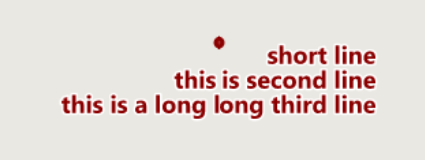
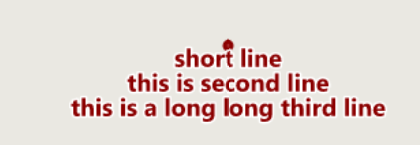
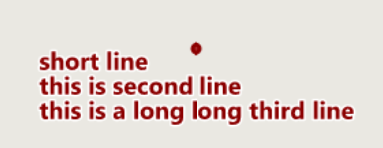
  2. DrawingTextAlignment.Left/Right is multi‑line justification (how lines line up against each other, like CSS text-align); a single line has nothing to justify against, so it stays centered on the point. For example:

DrawingTextAlignment.Center:
image
DrawingTextAlignment.Left
image
DrawingTextAlignment.Right
image

Sorry for the confusing. The documentation has been improved and will be available in the next beta.

To anchor a single line to a point, the coordinate is the center, just offset by half the measured size:

var size = canvas.MeasureText(text, font);
// top-left corner at (x, y):  (screen y grows downward)
canvas.DrawTextWithScreenCoordinate(text, font, brush,
    x + size.Width / 2f, y + size.Height / 2f, DrawingLevel.LevelOne);
// left edge: x + size.Width/2, y   | right edge: x - size.Width/2, y
// top edge:  x, y + size.Height/2  | bottom:     x, y - size.Height/2

That handles both horizontal and vertical anchoring. If you’re labeling features rather than hand‑drawing, TextStyle.PointPlacement (TextPlacement, nine anchors) does this for you.

Thanks,
Ben

1 Like