Google Map Tiles API support in ThinkGeo
ThinkGeo now includes a new Google Map Tiles API overlay, and the existing Google Maps Static API classes have been renamed to make the two Google integrations clearer.
There are now two Google map API families:
Google Map Tiles API
Use this for new Google map integrations.
- Overlay:
GoogleMapTilesOverlay - Core layer:
GoogleMapTilesAsyncLayer - Google service: Google Map Tiles API
- Rendering model: 256 x 256 XYZ tiles
- Supports roadmap, satellite, terrain, hybrid, traffic, and Street View availability layer options
Google Maps Static API
Use this only when you specifically need the older Static API behavior.
- Overlay:
GoogleMapsStaticOverlay - Core layer:
GoogleMapsStaticAsyncLayer - Google service: Google Maps Static API
- Rendering model: Static API image requests
The previous Static API names are still available for source compatibility, but they are now obsolete and planned for removal after v15.3:
GoogleMapsOverlay      // obsolete, use GoogleMapsStaticOverlay
GoogleMapsAsyncLayer   // obsolete, use GoogleMapsStaticAsyncLayer
Screenshot
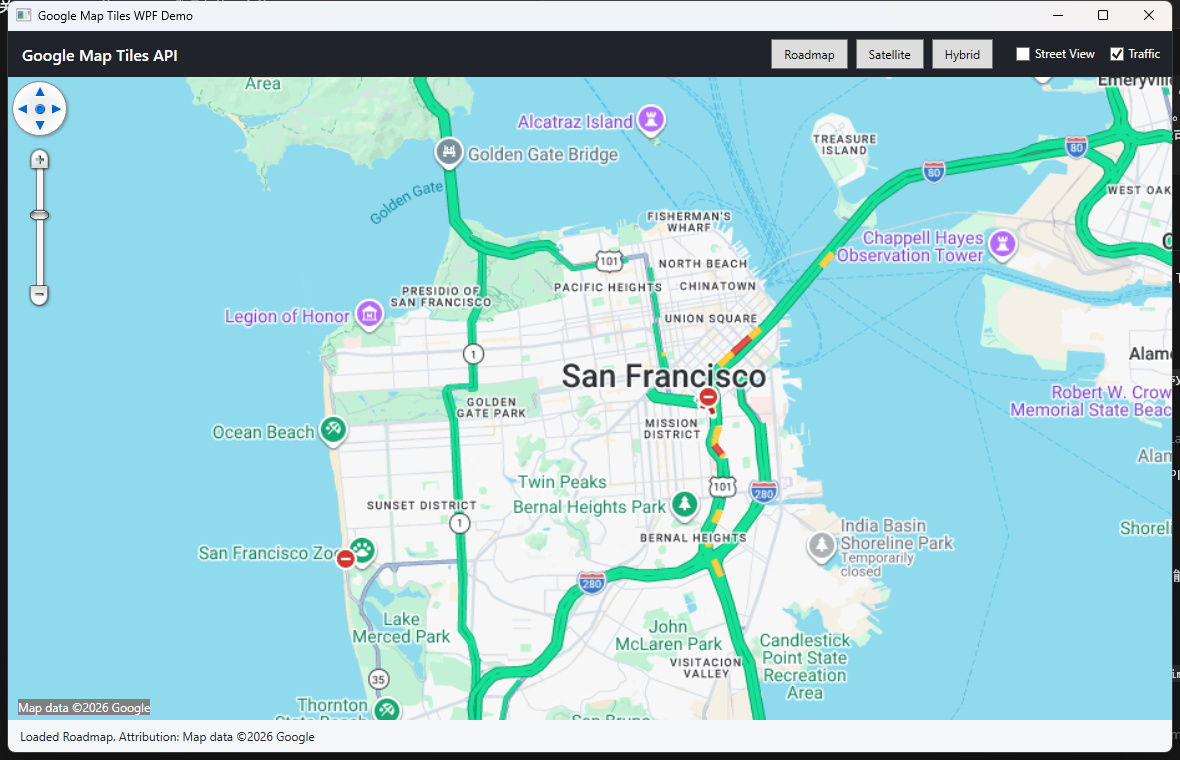
The screenshot below shows the new GoogleMapTilesOverlay running in a WPF sample with the traffic layer enabled.
New Google Map Tiles API
The new GoogleMapTilesOverlay uses Google’s newer Map Tiles API 2D tile service. It creates a Google Map Tiles session and then requests map tiles through the 2D tile endpoint.
Supported map types:
GoogleMapTilesMapType.Roadmap
GoogleMapTilesMapType.Satellite
GoogleMapTilesMapType.Terrain
GoogleMapTilesMapType.Hybrid
Supported image format settings:
GoogleMapTilesImageFormat.Automatic
GoogleMapTilesImageFormat.Png
GoogleMapTilesImageFormat.Jpeg
Optional Google session layers:
overlay.IsTrafficLayerEnabled = true;
overlay.IsStreetViewLayerEnabled = true;
Notes:
-
IsTrafficLayerEnabledoverlays Google traffic information on the map. -
IsStreetViewLayerEnabledoverlays Google’s Street View availability layer. - The Street View availability layer is not Street View panorama imagery.
- Traffic and Street View availability are part of the Google Map Tiles session request. If you change them at runtime, recreate the overlay or close and refresh it so a new session is created.
WPF example
using ThinkGeo.Core;
using ThinkGeo.UI.Wpf;

var overlay = new GoogleMapTilesOverlay(apiKey, GoogleMapTilesMapType.Roadmap)
{
    RequestLanguage = "en-US",
    Region = "US",
    ImageFormat = GoogleMapTilesImageFormat.Automatic,
    IsTrafficLayerEnabled = true,
    IsStreetViewLayerEnabled = false
};

mapView.MapUnit = GeographyUnit.Meter;
mapView.Overlays.Add("Google Map Tiles", overlay);
await mapView.RefreshAsync();
WinForms example
using ThinkGeo.Core;
using ThinkGeo.UI.WinForms;

var overlay = new GoogleMapTilesOverlay(apiKey, GoogleMapTilesMapType.Hybrid)
{
    RequestLanguage = "en-US",
    Region = "US",
    IsTrafficLayerEnabled = true
};

mapView.MapUnit = GeographyUnit.Meter;
mapView.Overlays.Add("Google Map Tiles", overlay);
await mapView.RefreshAsync();
MAUI example
using ThinkGeo.Core;
using ThinkGeo.UI.Maui;

var overlay = new GoogleMapTilesOverlay(apiKey, GoogleMapTilesMapType.Roadmap)
{
    RequestLanguage = "en-US",
    Region = "US",
    ImageFormat = GoogleMapTilesImageFormat.Automatic,
    IsTrafficLayerEnabled = true,
    IsStreetViewLayerEnabled = true
};

mapView.MapUnit = GeographyUnit.Meter;
mapView.Overlays.Add(overlay);
await mapView.RefreshAsync();
Attribution
Applications using Google Map Tiles API content must display Google Maps attribution and copyright information according to Google Maps Platform requirements.
GoogleMapTilesOverlay refreshes attribution during drawing. You can also retrieve it directly:
string attribution = await overlay.GetAttributionAsync();
Or retrieve attribution for a specific extent and scale:
string attribution = await overlay.GetAttributionAsync(extentInDecimalDegree, currentScale);
Caching and prefetch behavior
GoogleMapTilesOverlay and GoogleMapTilesAsyncLayer are intended for live online visualization of Google Map Tiles API content.
To avoid accidentally persisting, prefetching, or reusing Google tile content through ThinkGeo tile-cache APIs, the new Google Map Tiles implementation blocks the following settings:
overlay.TileCache = someCache;              // NotSupportedException
overlay.ProjectedTileCache = someCache;     // NotSupportedException
overlay.IsCacheOnly = true;                 // NotSupportedException
overlay.TileBuffer = 1;                     // NotSupportedException

layer.TileCache = someCache;                // NotSupportedException
layer.ProjectedTileCache = someCache;       // NotSupportedException
await layer.GenerateTileCacheAsync(...);    // NotSupportedException
The Desktop and MAUI overlays also keep Google Map Tiles rendering at 256-pixel tiles and block settings that would enable tile prefetching or tile retention caching.
Google Maps Static API rename
The older GoogleMapsOverlay and GoogleMapsAsyncLayer names were ambiguous because they specifically used Google Maps Static API. To make the service clear, use the new explicit Static API names:
GoogleMapsStaticOverlay
GoogleMapsStaticAsyncLayer
The old names still compile, but they now produce obsolete warnings:
[Obsolete("This class is deprecated and will be removed after v15.3. Please use GoogleMapsStaticOverlay instead.")]
public class GoogleMapsOverlay : GoogleMapsStaticOverlay
Static API old code
using ThinkGeo.UI.Wpf;

var overlay = new GoogleMapsOverlay(apiKey)
{
    MapType = GoogleMapsMapType.RoadMap,
    RequestLanguage = "en"
};

mapView.Overlays.Add("Google Maps Static", overlay);
await mapView.RefreshAsync();
Static API new explicit name
using ThinkGeo.UI.Wpf;

var overlay = new GoogleMapsStaticOverlay(apiKey)
{
    MapType = GoogleMapsMapType.RoadMap,
    RequestLanguage = "en"
};

mapView.Overlays.Add("Google Maps Static", overlay);
await mapView.RefreshAsync();
Preferred new Map Tiles API code
using ThinkGeo.Core;
using ThinkGeo.UI.Wpf;

var overlay = new GoogleMapTilesOverlay(apiKey, GoogleMapTilesMapType.Roadmap)
{
    RequestLanguage = "en-US",
    Region = "US",
    IsTrafficLayerEnabled = true
};

mapView.Overlays.Add("Google Map Tiles", overlay);
await mapView.RefreshAsync();
Which API should I use?
Use GoogleMapTilesOverlay when:
- You are starting a new Google map integration.
- You need tile-based online map rendering.
- You need roadmap, satellite, terrain, or hybrid tiles.
- You need traffic overlay support.
- You need Street View availability layer support.
- You want the Google integration to fit naturally into the ThinkGeo tile overlay model.
Use GoogleMapsStaticOverlay when:
- Your existing application specifically depends on Google Maps Static API behavior.
- You only want to update from
GoogleMapsOverlayto a clearer Static API name. - Your business or billing workflow still depends on Maps Static API.
Avoid using GoogleMapsOverlay and GoogleMapsAsyncLayer in new code. They are compatibility names only and are planned for removal after v15.3.
Google Cloud setup
For GoogleMapTilesOverlay:
- Enable Map Tiles API in the Google Cloud project.
- If the API key is restricted, allow Map Tiles API for that key.
For GoogleMapsStaticOverlay:
- Enable Maps Static API in the Google Cloud project.
- If the API key is restricted, allow Maps Static API for that key.
If the key is restricted but the corresponding API is not allowed, Google will reject the request and ThinkGeo will surface the provider error.
Licensing and API fit
Both APIs are still Google Maps Platform content, so applications must follow Google’s current terms, service-specific terms, and product documentation. The main difference is not just technical; it also affects the safe use cases for each API.
For GoogleMapsStaticOverlay and GoogleMapsStaticAsyncLayer:
- The Google Maps Static API returns one static image for one request.
- Standard Static API requests are limited to 640 x 640 pixels for the
sizeparameter. Withscale=2, Google can return 1280 x 1280 pixels for the same map coverage. - Larger Static API images require Google review/support. Google’s documentation currently says the maximum larger image size they can provide is 2048 x 2048 pixels.
- Do not use multiple Static API images as tiles and stitch them together to display a map larger than Google’s documented limits.
- Do not prefetch, cache, store, export, bulk download, or reuse Google Maps content outside the permitted Google Maps Platform service behavior.
- Do not remove, obscure, or modify Google attribution, copyright, logo, or provider notices.
For GoogleMapTilesOverlay and GoogleMapTilesAsyncLayer:
- The Google Map Tiles API is intended for live map visualization using Google-provided tiles.
- Do not use the tiles for offline datasets, image analysis, machine interpretation, object detection, geodata extraction, resale, or similar non-visualization workflows.
- Do not prefetch, persist, or build a local tile package from Google tiles.
- Do not stitch, export, save, or transform the tiles into another map product or dataset.
- Always display the required Google Maps logo/attribution and data copyright attribution. The required attribution can change by viewport and tile content.
- The ThinkGeo implementation intentionally blocks ThinkGeo tile cache and prefetch settings for Google Map Tiles API content so developers do not accidentally use it as a cached tile source.
Useful Google references:
- Maps Static API larger image sizes: https://developers.google.com/maps/documentation/maps-static/start#larger-image-sizes
- Map Tiles API policies: https://developers.google.com/maps/documentation/tile/policies
- Google Maps Platform Terms of Service: https://cloud.google.com/maps-platform/terms