Eric_S
February 18, 2010, 2:35pm
1
Can anyone point me to an approqach where I can simply draw vertices on a line and have the ability to select a vertex and return its position? I have been looking at some of the editInteractiveOverlay samples and maybe I am missing something, as I don't want to actually edit the vertices. Just draw and select. Any pointers are greatly apreciated.Thanks.
Eric
Val
February 18, 2010, 4:45pm
2
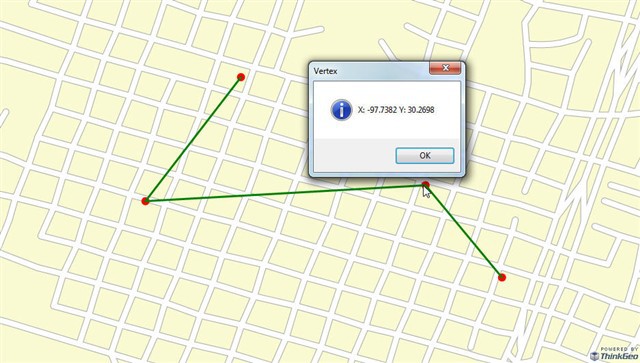
One way to do that is to use an InMemoryFeatureLayer with two features. Because, if you are just selecting a vertex and displaying, you don't need an EditInterectiveOverlay. Of the two features, one for the line itself and another one for the vertex. In the code below, I use the MapClick event to select a vertex and display its X and Y values in a message box. I hope this will help.
private void Post7115() { winformsMap1.MapClick += new EventHandler<MapClickWinformsMapEventArgs>(winformsMap1_MapClick); winformsMap1.MapUnit = GeographyUnit.DecimalDegree; winformsMap1.CurrentExtent = new RectangleShape(-97.7487, 30.274, -97.7343, 30.2658); winformsMap1.BackgroundOverlay.BackgroundBrush = new GeoSolidBrush(GeoColor.StandardColors.LightGoldenrodYellow); ShapeFileFeatureLayer streetLayer = new ShapeFileFeatureLayer(@"..\..\Data\austinstreets.shp"); streetLayer.ZoomLevelSet.ZoomLevel01.DefaultLineStyle = LineStyles.LocalRoad2; streetLayer.ZoomLevelSet.ZoomLevel01.ApplyUntilZoomLevel = ApplyUntilZoomLevel.Level20; LayerOverlay staticOverlay = new LayerOverlay(); staticOverlay.Layers.Add("StreetLayer", streetLayer); winformsMap1.Overlays.Add(staticOverlay); LineShape lineShape = new LineShape(); lineShape.Vertices.Add(new Vertex(-97.744, 30.2732)); lineShape.Vertices.Add(new Vertex(-97.747, 30.2693)); lineShape.Vertices.Add(new Vertex(-97.7382, 30.2698)); lineShape.Vertices.Add(new Vertex(-97.7358,30.2669)); MultipointShape multipointShape = new MultipointShape(); foreach (Vertex vertex in lineShape.Vertices) { multipointShape.Points.Add(new PointShape(vertex)); } InMemoryFeatureLayer inMemoryFeatureLayer = new InMemoryFeatureLayer(); inMemoryFeatureLayer.ZoomLevelSet.ZoomLevel01.DefaultPointStyle = PointStyles.CreateSimpleCircleStyle(GeoColor.StandardColors.Red, 12); inMemoryFeatureLayer.ZoomLevelSet.ZoomLevel01.DefaultLineStyle = LineStyles.CreateSimpleLineStyle(GeoColor.StandardColors.Green, 3, true); inMemoryFeatureLayer.ZoomLevelSet.ZoomLevel01.ApplyUntilZoomLevel = ApplyUntilZoomLevel.Level20; inMemoryFeatureLayer.Open(); inMemoryFeatureLayer.EditTools.BeginTransaction(); inMemoryFeatureLayer.EditTools.Add(new Feature(multipointShape)); inMemoryFeatureLayer.EditTools.Add(new Feature(lineShape)); inMemoryFeatureLayer.EditTools.CommitTransaction(); inMemoryFeatureLayer.Close(); LayerOverlay lineOverlay = new LayerOverlay(); lineOverlay.Layers.Add("Line", inMemoryFeatureLayer); winformsMap1.Overlays.Add(lineOverlay); winformsMap1.Refresh(lineOverlay); } void winformsMap1_MapClick(object sender, MapClickWinformsMapEventArgs e) { FeatureLayer Layer = winformsMap1.FindFeatureLayer("Line"); Layer.Open(); Collection<Feature> selectedFeatures = Layer.QueryTools.GetFeaturesNearestTo(e.WorldLocation, GeographyUnit.DecimalDegree, 2,ReturningColumnsType.NoColumns); // GetFeaturesContaining(e.WorldLocation, new string[1] { "CNTRY_NAME" }); Layer.Close(); if (selectedFeatures.Count > 0) { foreach (Feature feature in selectedFeatures) { if (feature.GetWellKnownType().ToString() == "Multipoint") { MultipointShape multipointShape = (MultipointShape)feature.GetShape(); PointShape pointShape = multipointShape.GetClosestPointTo(e.WorldLocation, GeographyUnit.DecimalDegree); MessageBox.Show("X: " + Math.Round(pointShape.X,4) + " Y: " + Math.Round(pointShape.Y,4), "Vertex", MessageBoxButtons.OK, MessageBoxIcon.Information, MessageBoxDefaultButton.Button1, (MessageBoxOptions)0); } } } }
Eric_S
February 19, 2010, 7:56am
3
Thanks Val, this works beatifully. Exactly the pointer I needed without having to work with an editOverlay’s control points. Eric
Val
February 19, 2010, 9:30am
4
You are welcome and don't forget to check the Code Community for new projects.
code.thinkgeo.com/