hi Support Team,
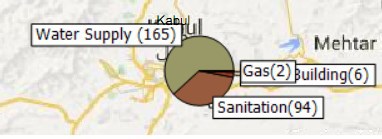
i have a problem with Zedgraph and pieitems, when the pieItems are small, the label of them overlap each other (Find Attached picture- Gas overlap the capacity building in this situation )
Is there a way to solve this problem?
in the other words,Is it possible to change their place
my code is:
ChangeLabelPosition(((ShapeFileFeatureLayer)((LayerOverlay)currentMap.CustomOverlays["PaiOverlay"]).Layers["Cities"]), 100);
ZedGraphControl zedGraph = new ZedGraphControl();
zedGraph.Size = new Size(400, 100);
zedGraph.GraphPane.Fill.Type = FillType.None;
zedGraph.GraphPane.Chart.Fill.Type = FillType.None;
zedGraph.BringToFront();
zedGraph.GraphPane.Border.IsVisible = false;
zedGraph.GraphPane.Chart.Border.IsVisible = false;
zedGraph.GraphPane.XAxis.IsVisible = false;
zedGraph.GraphPane.YAxis.IsVisible = false;
zedGraph.GraphPane.Legend.IsVisible = false;
zedGraph.GraphPane.Title.IsVisible = false;
int count = 0;
PieItem pieItem1;
FontSpec fs=new FontSpec("Arial",8,Color.Black,true,false,false);
foreach (var d in data)
{
if (!d.Nos.HasValue)
{
continue;
}
pieItem1 = null;
pieItem1 = zedGraph.GraphPane.AddPieSlice(Convert.ToDouble(d.Nos), GetColorFromGeoColor(GeoColor.FromHtml(TypeColorCollection[d.Type].ToString())), 0, d.Type + "(" + Math.Round(d.Nos.Value) + ")");
pieItem1.LabelDetail.IsVisible = true;
pieItem1.LabelDetail.FontSpec.Size = 50;
pieItem1.LabelDetail.FontSpec.Family = "Tahoma";
pieItem1.LabelDetail.IsClippedToChartRect = true;
??? how to change the label position or prevent label overlap???/
pieItem1.Displacement = 0.1;
count++;
}
zedGraph.AxisChange();
e.Bitmap = zedGraph.GraphPane.GetImage();
LablePostion.png (15.5 KB)
Hi Hassan,
Just like my reply in other topic, we don’t have more experience on the complex situation for the Zedgraph component.
Have you tried the 2 APIs I suggested before? Maybe you want to do more test to see which API can work for that.
And I think if anyone who have experience on this issue can reply here is welcome.
Regards,
Don