
ThinkGeo.com    |     Documentation    |     Premium Support

Selecting a Feature from a Layer (Polygon vs. Multipolygon)

We have several data files that contain multi part features, one for example contains land polygons that may be made of 1 or more polygon features. All features are coded as POLYGON if I look at the WKT, but are clearly multi part polygons.

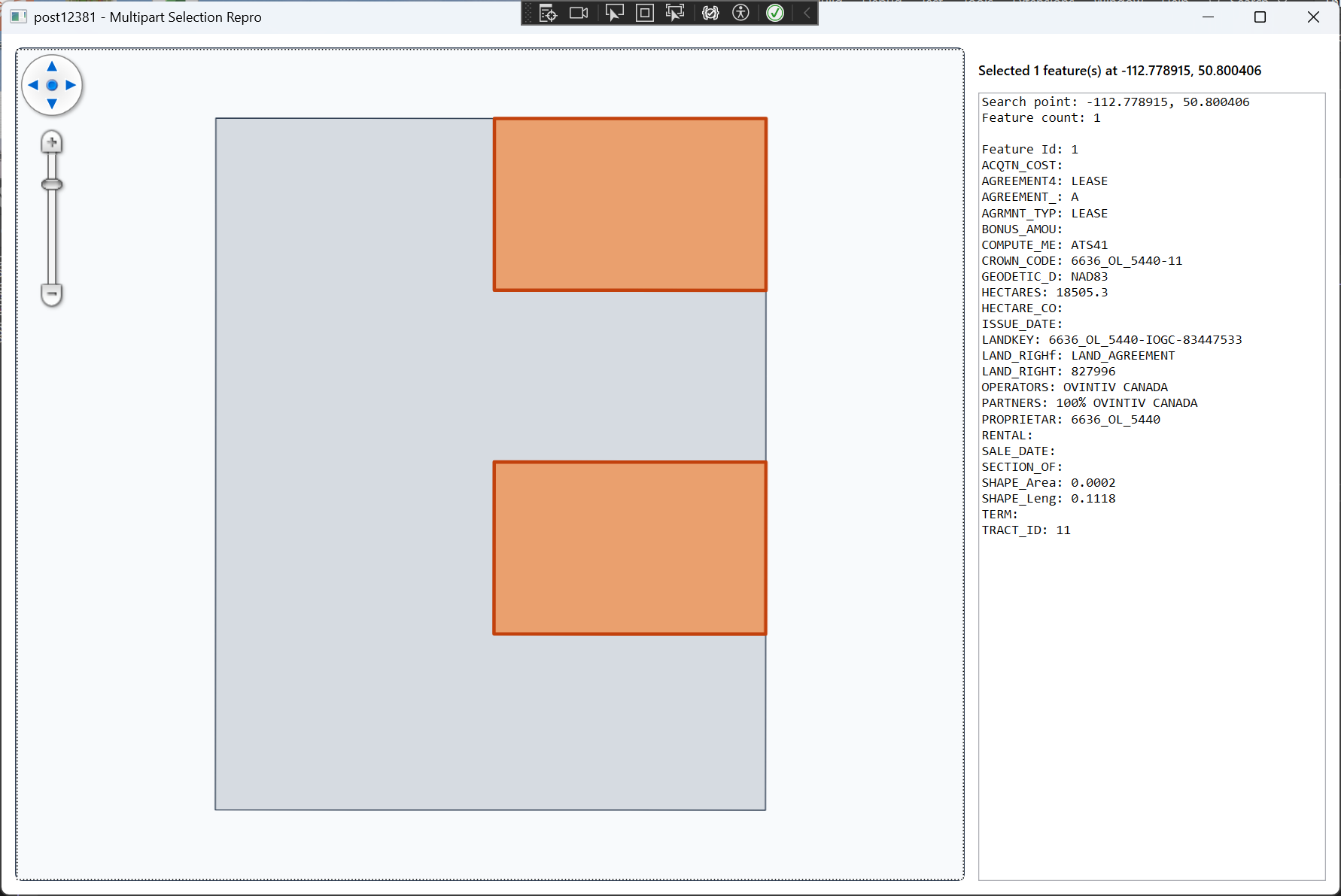
Using a PointShape as a selector I ask the layer.QueryTools.GetFeatureIntersecting(searchShape, ReturningColumn.AllColumns)

If I select the first polygon in the feature, it will select all polygons and I can add this feature to a InMemoryFeatrueLayer, and I am able to see all part of it. If I select another polygon that I know is part of that multipart object, it does not select it and nothing happens.

Loading this into QGis I am able to select any polygon in the Multi Part object and it will select it.

Do these layers need to be MULTIPOLYGON to work, or am I missing some basic search function?

Thoughts?

I will see about getting access to the file I am using, just need to get it on a cloud somewhere first.
Hi Chris,

A polygon with multiple outer rings is generally considered an invalid geometry . In most cases, it should be represented as a multipolygon instead.

I’m curious what data source you’re using. Some formats (like shapefiles or FileGeoDatabase) don’t explicitly mark rings as inner or outer, so the GIS engine has to infer that from the geometry.

If you directly read a WKT polygon that contains multiple outer rings, it would typically be treated as invalid and may have weird result (I think in your case all the rings except for the 1st one were considered as inner rings so not selectable). Tools like QGIS may automatically normalize this and convert it into a multipolygon behind the scenes.

ThinkGeo doesn’t automatically normalize these cases, but we do provide APIs to validate and fix geometries:

feature.IsGeometryValid(out TopologyValidationError);
feature.MakeGeometryValid();

Just note that MakeGeometryValid() may modify the geometry in ways you might not expect, so it’s best to review the result.

In general, we recommend ensuring the data is valid at the source. If this is coming from a custom format, try to avoid creating invalid polygons. Otherwise, let us know which format you’re using—there’s a chance it could be a bug on our side.

Also, we just fixed a related issue for FileGeoDatabase here:

Thanks,
Ben

Thanks for getting back to me.

In our case I am pretty sure it is not a “Ring” issue. What we have is some land sections that represent a surface rights for Oil and Gas exploration. This can be made up of a single polygon, or could be many polygons (usually not overlapping) that represent other sections but are the same “Lease” / “Feature” as they are treated as a single feature.

Selecting any of the polygons that make up this feature should select all of the polygons that make up that feature.

I have attached a small shapefile that exhibits this. The Feature in the lower right seems to be the “Main” features (there are 2 here). Selecting one or both highlights all items on this layer, but trying to select any of the objects in the Top Left does not select anything.

I hope this works for you.

MAP Crown Land Result Set 1.zip (3.2 KB)