
ThinkGeo.com    |     Documentation    |     Premium Support

Simple way to get the SRID of a Geodatabase Table?

I am trying to do an import of Geodatabase files, as part of that import I am looking to determine the Coordinate Reference System a given table (FeatureSource) is using.

I have dug around and looked at the FileGDBAPI calls, but those don’t seem to work for me. And I know this is outside this group.

Is there a way to open a GeoDatabase in ThinkGeo and get the SRID of a specific table?

I know this is quite broad, but this sums up the end goal for me.
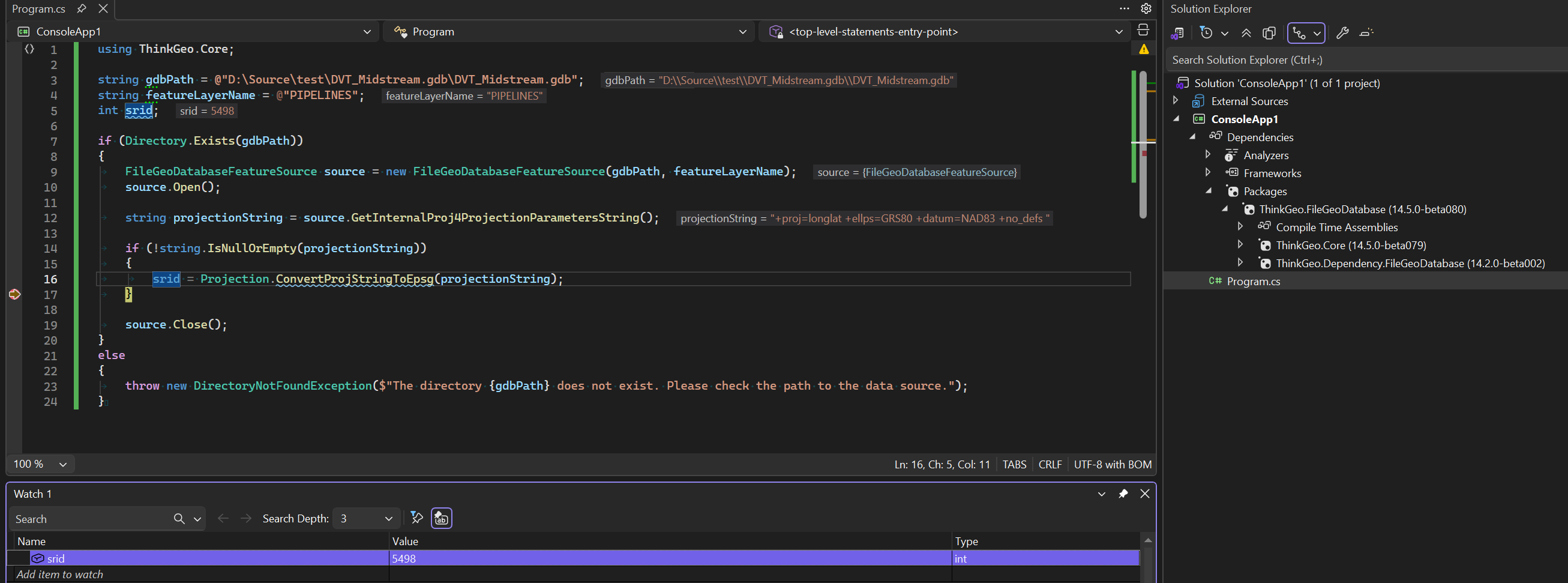
As a follow-up, I tried using the following snippet:

        FileGeoDatabaseFeatureLayer layer = new FileGeoDatabaseFeatureLayer(gdbFilePath, featureClassName);
        layer.Open();

        string projectionString = layer.GetInternalProj4ProjectionParametersString();

in this case it crashes out (no exception, nothing) when it tries to execute the GetInternalProj4ProjectionParameterString() statement. This is identical to the initial issues I was having with trying the FileGDBAPI calls directly.

Hi Chris,

It’s recreated and fixed in beta073. Pull the latest and just run the same method (layer.GetInternalProj4ProjectionParametersString()).

Some geodatabase has a nested structure (for example in my test db \zoning is a Feature Dataset containing \zoning\zoning as the actual Feature Class.) Calling GetDatasetDefinition(path, “Feature
Class”) crashes the entire app (uncatchable native exception) when the path points to a Feature Dataset or a nested Feature Class. The fix tries “Feature Dataset” type first (which works and
contains the spatial reference), then falls back to “Feature Class” and “Table” types for root-level items.

Thanks,
Ben

Created a nice, simple test project, loaded it with Beta074 (the latest I would guess) and proceeded to run. The Zoning.gdb from the HowDoI samples works as expected, but our .gdb folders still crash on the GetInternal… call (as before).

Looking at the Zoning.gdb in QGis I see that nested structure you talk about, whereas ours have the feature source at the root as you mention.

Using QGis I moved the Zoning feature source up to the root of the zoning.gdb and it too now does not work. QGis is still able to access it. Could you confirm my findings.

Can you send me your test data, (or the modified Zoning data)? just want to make sure we are on the same page.

Okay, use your Zoning.gdb (From the samples) it works, this one I moved the Zoning feature up to the root using QGis. zoning_Root.gdb.zip (628.2 KB)

This example is indicative of the files we are working with.

I drag and drop the zoning_Root.gdb to QGIS, I can see it’s CRS but no map is displayed on the map. Is this the same case on your end? My QGis is 3.36.0.

I was focused on the CRS, didn’t try to open the actual feature, but yes, it does the same on mine. Guess that my attempt at a hack for testing buggered up the whole thing. Please disregard.

I am going to track down a gdb that I can send you that is not measured in the gigabytes. Give me a bit.

no problem, take your time.

Ok, I have a 56 meg file, can I just attach it, or is there another process I should use?

Can you share it through google drive and post the link here, or send the link to support@thinkgeo.com if you want to keep it private?

I hope this works

TestGdbFile

Hi Chris, it’s recreated and fixed in the latest beta078. Pull and have a try.

No Joy, still crashes on the GetInternal… call

        string gdbPath = @"K:\TestSeismic\DVT_Midstream.gdb";
        string featureLayerName = @"PIPELINES";
        int srid;

        if (Directory.Exists(gdbPath))
        {
            FileGeoDatabaseFeatureSource source = new FileGeoDatabaseFeatureSource(gdbPath, featureLayerName);
            source.Open();

            string projectionString = source.GetInternalProj4ProjectionParametersString();

            if (!string.IsNullOrEmpty(projectionString))
            {
                srid = Projection.ConvertProjStringToEpsg(projectionString);
            }

            source.Close();
        }
        else
        {
            throw new DirectoryNotFoundException($"The directory {gdbPath} does not exist. Please check the path to the data source.");
        }

The above code works fine for me with the latest beta. Please make sure it’s referencing ThinkGeo.Dependency.FileGeoDatabase(14.2.0-beta002), not 001.

Further testing,

Running this as a console app in VS2026 (.net10), it works as expected.

Running it in VS2022, WPF .net framework 4.7.2, it still crashes. The ThinkGeo.UI.Wpf nuget beta is added here. Anything there that might help as a clue?

The .net framework project created in VS 2022 is in an old format which has some issues loading modern nuget packages with unmanaged dependencies. It will be fine if you convert it to the new SDK-Style project. (it would still be .net framework and can still be opened with vs 2022).

Open this one in vs2022 and see if it works for you.
Net472GeoDBDemo.zip (4.8 KB)

That, my friend, has solved this issue, and onward we go.

Our group will need to have a small discussion about:

  • Using the most recent Beta of ThinkGeo as we move forward in development, there are many issues addressed in the Beta. Of Course, we will need 14.5.0 release before we release.
  • Switching to the “SDK” style as that was the last key. Might just solve other issues we were working around in regards to native .dll files.

Ben, you are the best!

You are always welcome, Chris!

We’re planning to release v14.5 in May. Let me know if there’s anything we can do on our end to support your release.

And yes, I strongly recommend switching to the new SDK-style projects. They’re compatible with .NET 5+ projects, simpler than the old format, and it seems many NuGet packages have stopped testing against the old project format.

Anyway, just let us know if you have any question!