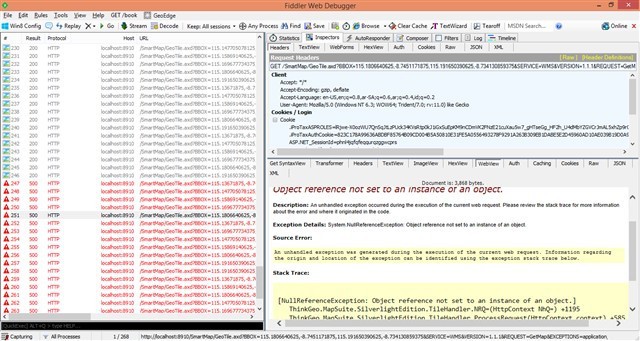
Are you using our ServerLayerOverlay? I view the code and find the default value for it assign a random GUID to "Connector" and empty string to "overlayid".
So the different should be caused by the process abort after ServerLayerOverlay initialized. I am not sure where is the problem but if there are some code should be helpful for research it.
At first I have 4 shapefile, I load each file using separate layers, and add it into 1 serveroverlay that I’ve created before.
Now I want to be able to control what layer can be seen in my silverlight apps, so I change how I load those shapefile. I load each shapefile and add it into separate overlay.
because now I have separate overlay, I can easily remove and add ServerOverlay in my Silverlight Apps so that I can only see what layer(s) I want to see.
And don’t forget on top of that, I also add Google overlay via ServerOverlay too as base Overlay and I also can hide and show this overlay.
Thanks for your detailed description of the issue, there are 2 reasons why that error occurs in your application, just shown as below:
1. The OverlayId should be same to the one you specified in the Asp.NET application, when you create the ServerLayerOverlay on server side, for example, if the code in Asp.NET is:
the client in Silverlight should use the ID "NativeServerWithGoogleSatelliteMap" to create the ServerLayerOverlay, just shown as following:
ServerLayerOverlay overlay4 = new ServerLayerOverlay("NativeServerWithGoogleSatelliteMap", "SilverlightMapConnector1");
2. Please make sure the ConnectorId is not empty, because this is a very important parameter to fetch the configurations from storage on server side. If it’s empty, it will give the exception shown in your attached image.
Sorry for the inconvenience, I guess we shouldn’t public the constructor of ServerLayerOverlay without parameter in SilverlgitEdition.dll, we will do the enhancements in next release.
I just want to add my opinion about this problem, why doesn’t MapSuite service just ignore the request (instead of throwing error) when it couldn’t find the overlay based on id parameter. Because in the end, the silverlight client doesn’t even know what has happened or wrong.
Thank you very much for your suggestion, I was thinking maybe we can add a ExceptionMode property to the Map object, and make it as "DrawException" by default to avoid app crash. I have entered this requirement to our issue tracking system. Hope it can be available in the daily builds soon.