ThinkGeo.com    |     Documentation    |     Premium Support

WMS and zoom levels

Hi,

Would it be possible to use WMS online maps so that after certain zoom level e.g. 17 no new images would be fetched from server and instead images from previous level would be used ?

Kind of how WMTS works when server does not provide any new tiles based on TileMatrix when zooming in the map (requests are not sent and previous images are used on high levels)

Asking because it seems that most of WMS servers does not provide any good quality images on high zoom levels and this would help to decrease the amount of requests and costs in case of paid service.

Br, Simo

Hi Simon,

WMS requests do not contain a zoom level. A WMS GetMap request is based on BBOX, WIDTH, and HEIGHT, so WMS does not have the same “maximum zoom level” or “fallback to the previous zoom level” concept that WMTS/XYZ tile services have. When you zoom in, the client sends a new BBOX + WIDTH + HEIGHT request. There is no defined “zoom 17” request, and the WMS server cannot automatically return “zoom 16” imagery instead.

I’m also considering whether a MaximumRequestScale would make sense, but it may be confusing because the horizontal and vertical request resolutions can be different (BBOX.Width / WIDTH vs. BBOX.Height / HEIGHT), especially when the requested image is stretched, so there is no single unambiguous “request scale” to compare against. We could add it, but it would introduce more confusion.

As a result, I think it would be hard to add this property to WMS. You can either add some restrictions on the client side (MapView.MinScale, or customized MapView.Zooms), or use an XYZ/WMTS service with zoom levels available on the server side.

I hope this makes sense. Let me know what you think.

Thanks,
Ben

Hi,

Yes, I know that WMS works differently compared to WMTS that’s why I was asking “Kind of how WMTS works” :slight_smile:

We have had to add 3 extra zoom scales to map to give better resolution to see things on the map which are close to each other. We also have implemented possibility to download map to cache and downloading is the place now where this issue popped up. Normal case when user zooms to these extra levels it is not that big problem (amount of request/data is reasonable) although it feels kind of waste since images are just part of previous ones.

But with cache download e.g if download is done for 3km*3km area it could be that level 20 uses 1764 tiles / 17,64MB but level 23 uses 112896 tiles / 1,3GB. So amount of requests/data is so big that it is not possible to do the cache download to highest levels => map would not be available on our extra zoom levels without network connection.

Do you have any ideas how we could solve this kind of problem ?

Br, Simo

Hi Simo,

I see, so it’s not specific about WMS, but more about caching.

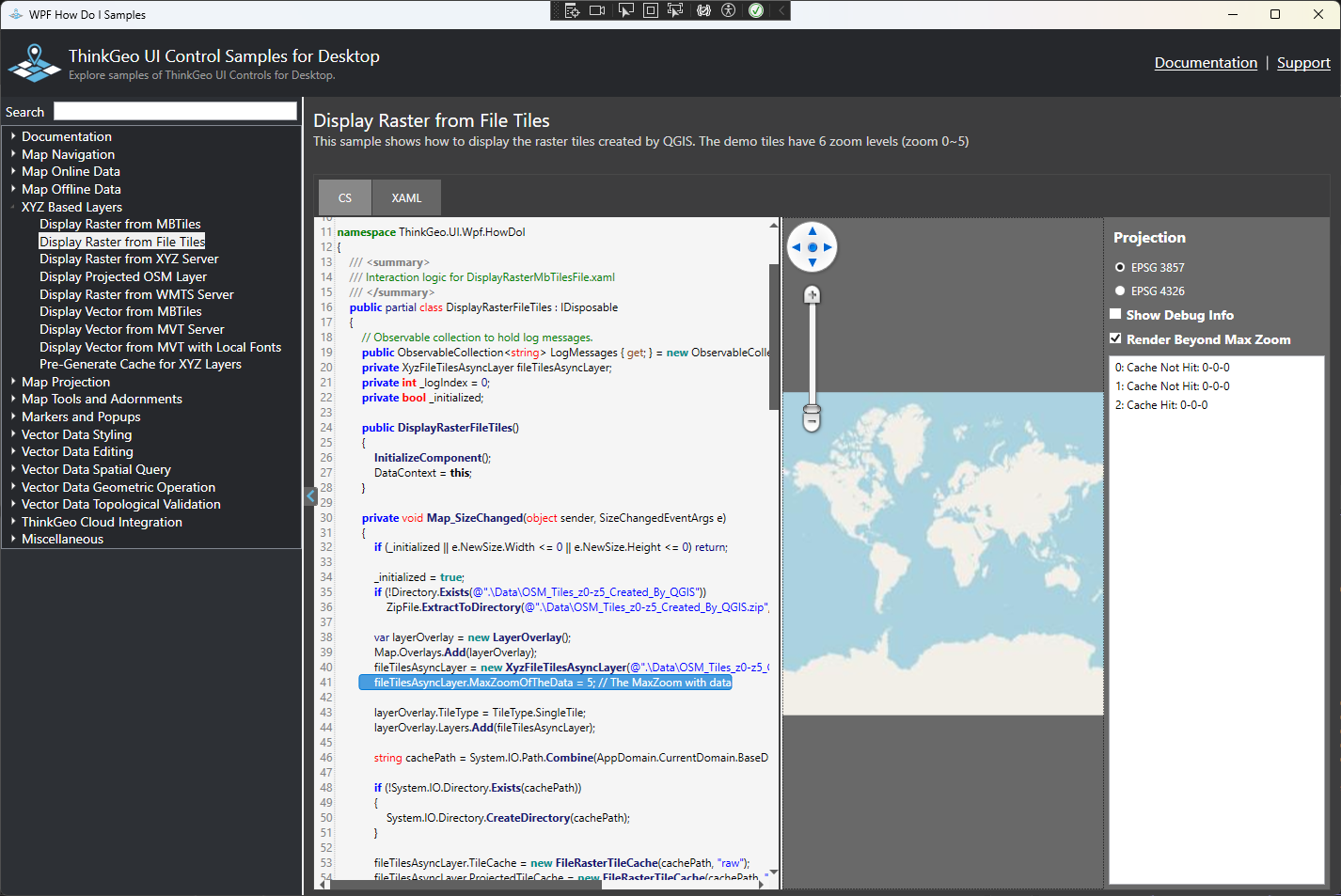
Please check this HowDoI sample:

  1. It load all the tiles from local cache
  2. it only has tiles for zoom 0-5, with “Render Beyond Max Zoom” enabled, it can render beyond zoom5.

Let me know if it doesn’t work for you.

Thanks,
Ben

Hi,

Well, that’s basically the exact functionality what is needed (set zoom level from which onwards tiles from that level are up-sampled) but how to use it with WMS since WmsAsyncLayer does not support MaxZoomOfTheData/RenderBeyondMaxZoom ? (Ideally it would be available for all other web based layers e.g. WFS/OGC Api but at this point WMS is the problematic one)

Also when testing it with WmtsAsyncLayer I noticed that even if those values are set and zoom levels after MaxZoomOfTheData are up-sampling tiles from previous level layer still sends unnecessary request to server on the background causing exceptions. So I would except that no requests are sent beyond zoom level set with MaxZoomOfTheData ?

Br, Simo

Hi Simo,

WmsAsyncLayer does not have MaxZoomOfTheData/RenderBeyondMaxZoom because WMS itself does not define a tile matrix or zoom level hierarchy. A WMS GetMap request simply asks for an image. Even if the client renders the map as multiple tiled WMS requests, each tile is still just an independent WMS GetMap image, and there is no standard “parent tile” or “previous zoom level” that the WMS layer can fall back to.

If your application is using tiled WMS rendering, the practical approach would be to handle this on the client side: cache those WMS-rendered tile images in memory or a tile cache, then reuse/up-sample the cached images with a custom layer or the demo pattern I shared. But adding MaxZoomOfTheData/RenderBeyondMaxZoom directly to WmsAsyncLayer would be confusing because those properties rely on tile matrix zoom semantics that WMS does not have.

For the WMTS issue you mentioned, we confirmed that when RenderBeyondMaxZoom was enabled, the layer could render the over-zoomed image from the max zoom level, but it could still bypass the tile cache and send an unnecessary request for the max-zoom parent tile in the background. This could cause server exceptions even though the visual result was already being up-sampled. We have fixed this in the latest version(v15.0.0-beta066) so the layer checks the cache first and avoids unnecessary source requests when the parent tile is already available.

Thanks,
Ben

Hi,

I misunderstood your point for sharing that demo. Thanks for clearing it out. It was actually quite easy to use existing tile cache from WMS layer and use custom layer on high zoom levels to reuse those tiles.

Also thanks for the fix for WMTS.

Br, Simo

Hi,

While testing WMTS with cache I noticed one issue. It seems that if cache is used and network is disconnected while application is running everything works as expected. But if the application is re-started without network connection WmtsLayer is not occasionally able to use existing cache.

Seems that atleast WmtsAsyncLayer OpenAsyncCore() or GetBoundingBoxCore() can throw an exception “The given key was not present in the dictionary.”. When this happens TileMatrixSetName is set but TileMatrixSets are not causing this exception when accessing TileMatrixSets with name.

Could you please check that issue ?

Br, Simo