I have been checking those new classes for WMS and WMTS for GPU rendering.
In our case we need to also support authentication for these services either with username/pwd or API key. Currently we have done it by hooking to layers SendingHttpRequest event and modifying HttpRequestMessage if needed.
What is the way to achieve the same with WmsRasterTileSource/WmtsRasterTileSource ? At least I could not see any events which could hooked to modify outgoing request.
Couple more questions raised when experimenting with these:
What is the correct way to use tile cache with GPU rendering ? With CPU rendering it’s handled on overlay level but how with GPU ?
How to get/control exceptions with FeatureSources ? With CPU you can control exceptions for layer and overlay with DrawingExceptionMode/ThrowingExceptionMode and hook to layers DrawingException for custom exception.
Good questions! and they are both answered in 15.0.0-beta166.
Tile cache
The GPU map caches data tiles on the source, not rendered images on the overlay - there is no offscreen image to keep. One property per source type:
XyzRasterTileSource.TileCache (already there), and new: WmsRasterTileSource.TileCache, WmtsRasterTileSource.TileCache. The same RasterTileCache family the classic layers take - FileRasterTileCache, InMemoryRasterTileCache. Tiles are keyed by zoom/column/row of the source’s web-mercator grid, so give each LAYERS/STYLES/format combination its own cache id. A failed request is not cached.
VectorTileSource.VectorTileCache (already there), and new: FeatureSourceVectorTileSource.VectorTileCache, a FileTileCache holding the cut MVT tiles - a shapefile that takes seconds to cut is cut once per tile, not once per run. When the data changes, GpuBasemap.RefreshVectorTiles(source, extent) drops the cached files of that area too.
Pre-generating is VectorMbTilesGenerator.GenerateMbTilesAsync or VectorPmTilesGenerator.GeneratePmTilesAsync from your feature layers, then MbTilesVectorTileSource / PmTilesVectorTileSource in the style.
Exceptions
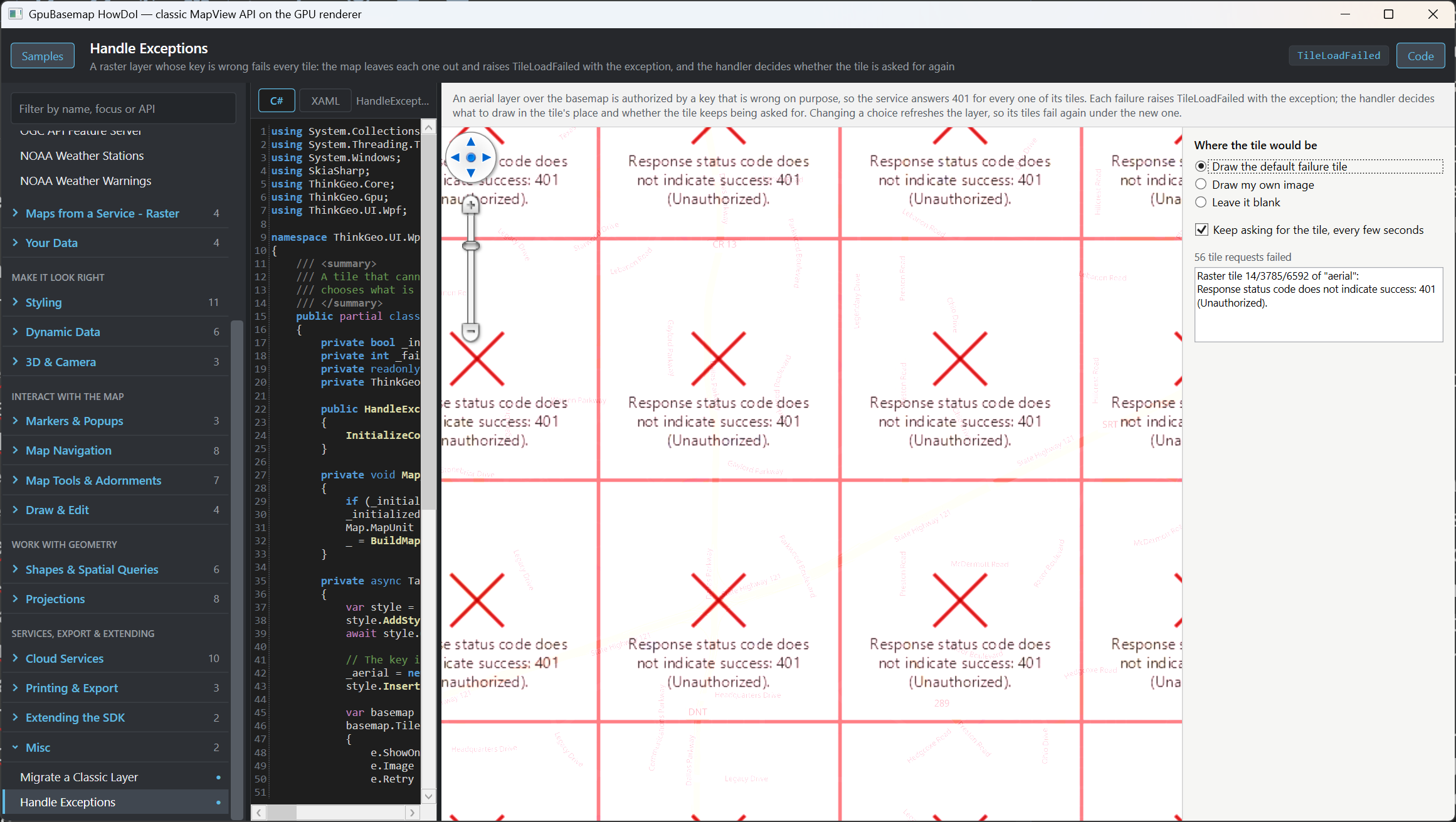
New: GpuBasemap.TileLoadFailed, raised on the UI thread for every tile that could not be fetched, cut or decoded, and for a source that could not be opened (a WMS/WMTS whose capabilities are unreachable: Zoom is -1, and the map opens anyway) - the source, the tile, the exception.
In the handler you choose what shows where the tile would be: e.ShowOnMap = true draws the classic failure tile (pink, a cross, the message); e.Image = yourGeoImage draws your own picture, drawn e.PixelSize square for 1:1; neither, and the tile is left out with what is underneath showing. Nothing is thrown - throw from the handler if you want an exception.
e.Retry decides whether the tile keeps being asked for while it is in view (every few seconds, never on every frame) or is parked until the view moves on: a raster tile keeps asking by default, a vector tile is parked.
Every failure is also in the GPU trace (ThinkGeoDebugger.LogType = ThinkGeoLogType.Gpu), and so is a sprite or glyph range that will not download.
Fixed alongside: a vector tile server answering 500 used to leave a blank tile; it is now a failure like the rest.
A “Handle Exceptions” sample in the HowDoI gallery’s Misc group shows the three choices and the retry switch.
One thing what I wish to have is better documentation about those json formatted styles. Of course there are examples on HowDol but it would be good to have clear documentation about the structure of json and supported key/value combinations. Since this is the new way for styling (instead of old ZoomLevel specific DefaultStyle/CustomStyle) it’s important to understand it well.
Agreed, a doc page is being written and I’ll keep you posted once it’s ready.
Until it is out, the format itself is not ours to define: it is the MapLibre GL style specification, the open continuation of the Mapbox GL style spec, and its published reference is accurate for the shape of the document:
We read the usual layer types: fill, line, circle, symbol, raster, fill-extrusion, hillshade, heatmap and background.
Edit it visually. Maputnik (https://www.maplibre.org/maputnik/ , now part of MapLibre) is an online editor for exactly this format - build or tweak a style there, export the JSON, and load it with MapStyle.LoadAsync(pathOrUrl) or MapStyle.LoadFromJsonAsync(json).
Turn the style log on:
ThinkGeoDebugger.LogLevel = ThinkGeoLogLevel.Message;          // it is None by default
ThinkGeoDebugger.LogType = ThinkGeoLogType.StyleJsonParsing;
ThinkGeoDebugger.LogStreamWriter = new StreamWriter("style.log") { AutoFlush = true };
and every key it could not use is named there, with the layer it came from - an unsupported layer type, a property form it does not read yet, a filter operator it ignored. A style that loads with an empty log is a style this renderer supports in full.
If there is a specific property you depend on, tell me which one and I will answer it directly rather than leave you waiting for the document.